
Function to check and change calculated Easyline systems.
Access to the command over: |
AutoCAD/BricsCAD |
Allplan |
|---|---|
Command line: _EASYLINESHOW
Assistant: Assistant: Assistant: Assistant: |
Toolbar: Heating | Heating Service | Toolbar: Ventilation | Ventilation Service | |
 |Ventilation Easyline |
 |Heating Easyline |
 |Ventilation Easyline |
After calling up the function a Dialogue opens:
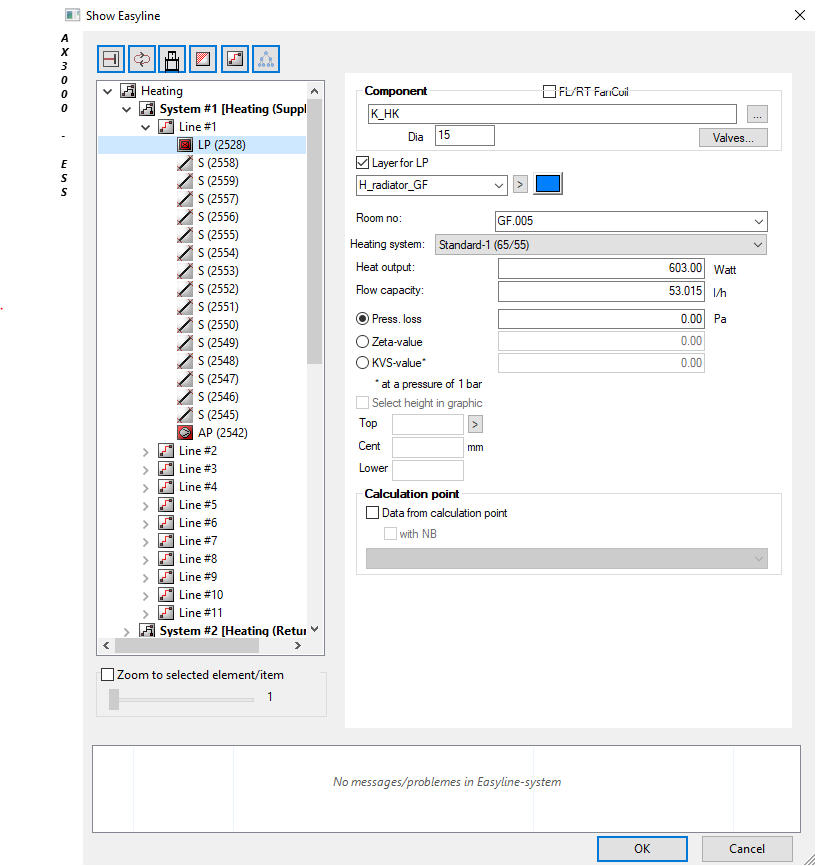
Dialogue-Options
Display |
|
|---|---|
Tree Structure |
All systems, start points, load points or linegroups and unlinked load points can be selected. If, for example, a Easyline Start point is selected, the corresponding tab to control or edit the parameters will be activated. |
Zoom |
The element selected in the tree structure will be zoomed in. The zoom-factor can be adjusted with the slidebar |
 - Show end lines on/off
 - Show loops on/off
 - Show line informations on/off
 - Show material informations on/off
 - Show fixed tracks in tree
Example:
All Loadpoint connetions are shown: