With this function you are able to construct a zone distributor.
Access to the command over: |
AutoCAD/BricsCAD |
|
|---|---|
Command line: _ZONENVERT
Assistant: |


After activating the function pick the 2 points in the graphic to determine the position of the zone distributor.
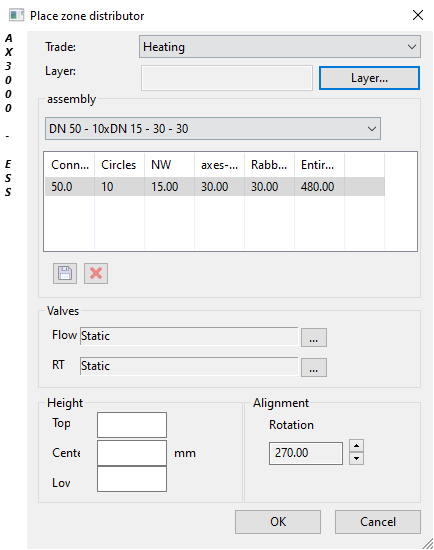
Dialogue-Options
Option |
Description |
|---|---|
Trade |
Here you can select the trade. |
Assembly |
Here you select freely between predefined zone distributors or enter a zone distributor.
...Saves the entered distributor.
Type: Sinus - Flow and return are allocated in a row VL/RL - Flow and return are allocated |
Valves |
Here you can select between predefined distributor buildups. |
Height |
Here you can enter the absolute height of the zone distributor. optional upper-, medium- or lower edge. |
Alignment |
Here you can determine all outlets at the distributor. |

 ...
...