With this function you are able to draw a distribution box.
Access to the command over: |
AutoCAD/BricsCAD |
|
|---|---|
Commandline: _VERTEILERBAU
Assistant: Assistant: Assistant: |


Select the radiator start point on the drawing and determine the direction with the second pick point.
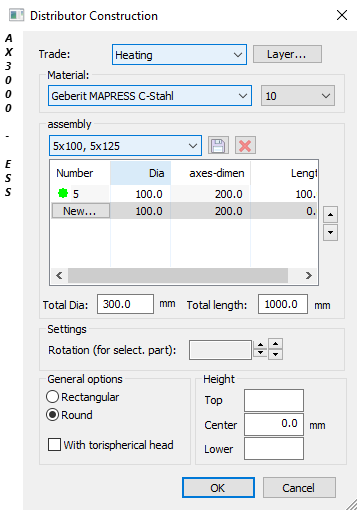
Dialogue-Options
Option |
Description |
|---|---|
Trade |
The current distribution box trade is set. Following trades are available:
|
|
A new Distribution box layer can be set. If no separate layer is determined for the distribution box, the current layer will be used. |
Material |
The material for the distribution box can be selected. Available materials are found in the Duct tables. |
Assembly |
Selects a stored distribution box constructions.
Saves the distibution box constructions. Names can now be selected.
The active distribution box sample will be deleted. |
Settings |
The positioning of a branch in the distribution box can be entered. Rotation (new direction) can be achieved over
Total DIA: The distribution box diameter.
Total Length: The entire length of distribution box.
|
General Options
|
The distribution box cross section is set here and the convex endcaps. |
Height
|
The height of the distribution box can be entered here. Select either the upper, middle or bottom edge. |





 every angle can be set.